

Best AI Tools for Product Management in India
Introduction
It’s past 11 p.m. on a Tuesday, and Rohan is still staring at three spreadsheets, a half-updated Trello board, and a WhatsApp group with 47 unread customer messages, each wanting something different. Rohan runs a small fintech app out of Pune. His developers are waiting for this week’s priorities, his co-founder wants a roadmap ready for an investor call on Thursday, and a ticket about a broken payment flow is buried between two requests for a “dark mode” and a “referral programme.” He knows roughly what he wants to build. He just can’t decide what comes first.
This is daily life for Indian founders, product managers, and small business owners. Ideas pile up faster than anyone can organise them, and feedback arrives through email, app reviews, sales calls, and Slack, often all on the same day.
This is where AI-powered product management tools help. They don’t replace product managers or their judgment. They take over the repetitive parts of the job — summarising feedback, drafting documentation, organising scattered ideas into roadmaps — so product teams get more time back for the strategic thinking that needs a human.
For Indian startups, SaaS companies, and lean product teams, that saved time matters even more, since most people here wear three or four hats at once. This article compares five of the best AI tools for product management in India, covering features, pricing, and what each tool is best for, so you can decide which fits your team.
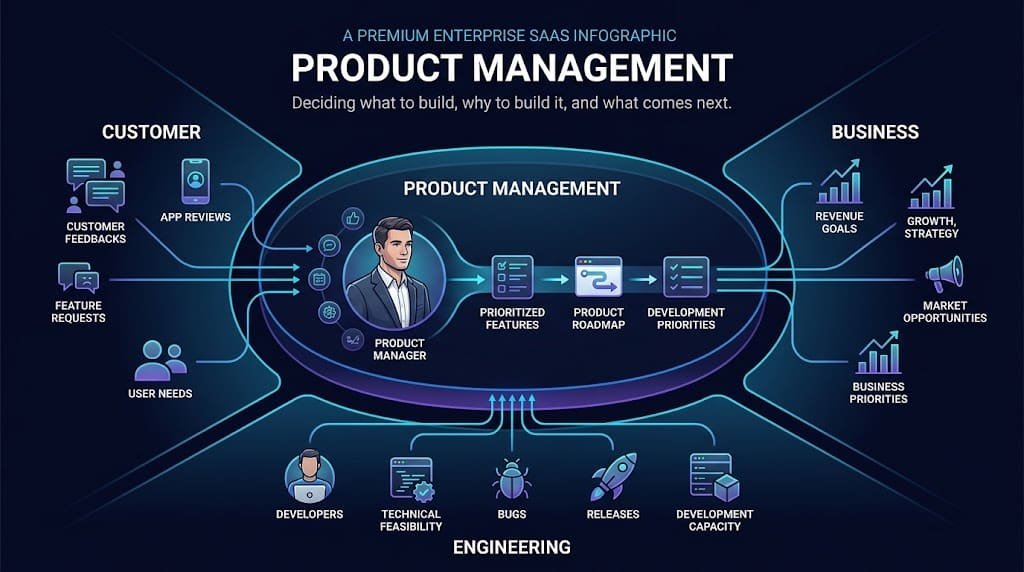
What Is Product Management?
Product management is about deciding what to build, why to build it, who it’s for, and what to prioritise next. A product manager sits between customers, business goals, and engineering, turning scattered requests into a coherent plan.
Take an Indian food-delivery startup getting requests, in the same week, for better delivery tracking, restaurant filters, loyalty rewards, new payment options, and a smoother ordering screen. The challenge isn’t building all five — it’s deciding which to solve first, based on customer value, business impact, cost, urgency, and technical feasibility.
Product Management vs Inventory Management
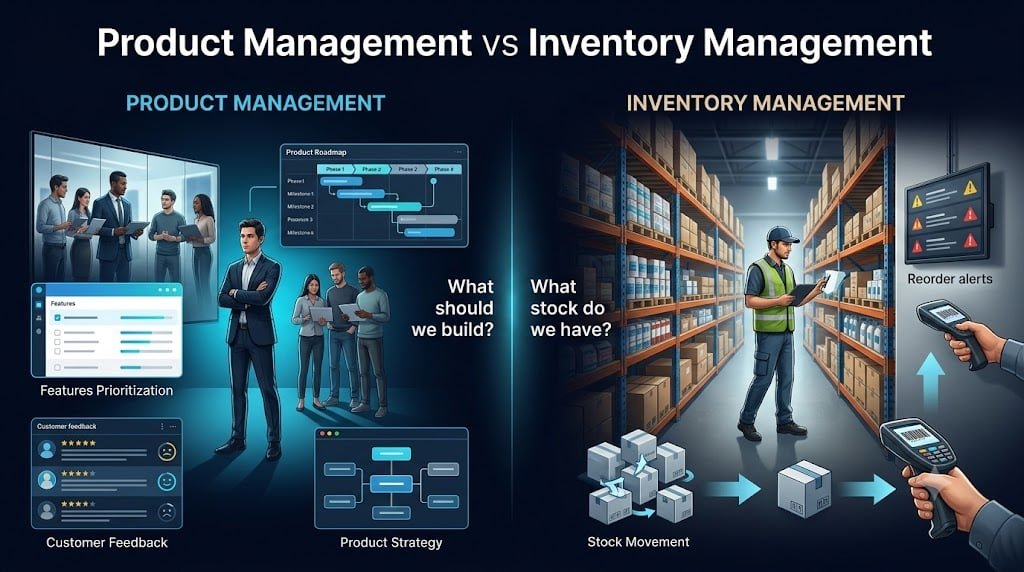
The two get mixed up regularly, especially by teams with retail or D2C background, but they describe very different jobs.
| Product Management | Inventory Management |
|---|---|
| Product strategy and development | Physical stock management |
| Decides what should be built | Tracks what stock is available |
| Product roadmaps | Stock levels |
| Feature prioritization | Reordering |
| Customer problems | Warehouses and stock movement |
| Product managers and founders | Operations and warehouse teams |
The two can overlap at physical-product businesses, but they remain fundamentally different functions — and this article is entirely about the first one.
How AI Product Management Tools Are Helping Businesses
AI hasn’t changed what product management is about. It has changed how much of the grunt work a small team has to do by hand.
- Faster research: AI can summarise feedback, app reviews, and call notes far faster than reading through them line by line.
- Better prioritisation: competing requests get organised by theme and impact, rather than by whoever shouted loudest in the last meeting.
- Faster roadmaps: several tools below can draft and update roadmaps directly from prioritised ideas.
- Less administrative work: AI can help with meeting summaries, documentation, task creation, and routine status updates.
- Better collaboration: product, engineering, design, and leadership work from the same shared information.
- Customer feedback analysis: repeated themes across dozens of tickets are far easier to spot with AI grouping.
- Faster decision-making: centralised, searchable information cuts down time spent digging through old threads.
This matters most for small Indian product teams, where one person often plays product manager, researcher, and coordinator at once. AI doesn’t replace that person — it gives them room to breathe

Who Are These Tools Best Suited For?
- Startup founders making product decisions themselves, who need a lightweight way to track ideas without hiring a full product team yet.
- Product managers juggling roadmaps, stakeholders, and shifting priorities across several documents.
- Small product teams that need to cut administrative overhead so more time goes into actual product work.
- SaaS companies constantly shipping and improving a digital product, where the backlog never really empties.
- E-commerce and consumer businesses separating genuine feedback patterns from one-off complaints.
- Growing companies moving off spreadsheets and scattered documents onto a dedicated system.
- Agencies and product consultants managing multiple clients’ roadmaps without losing track of any one of them.
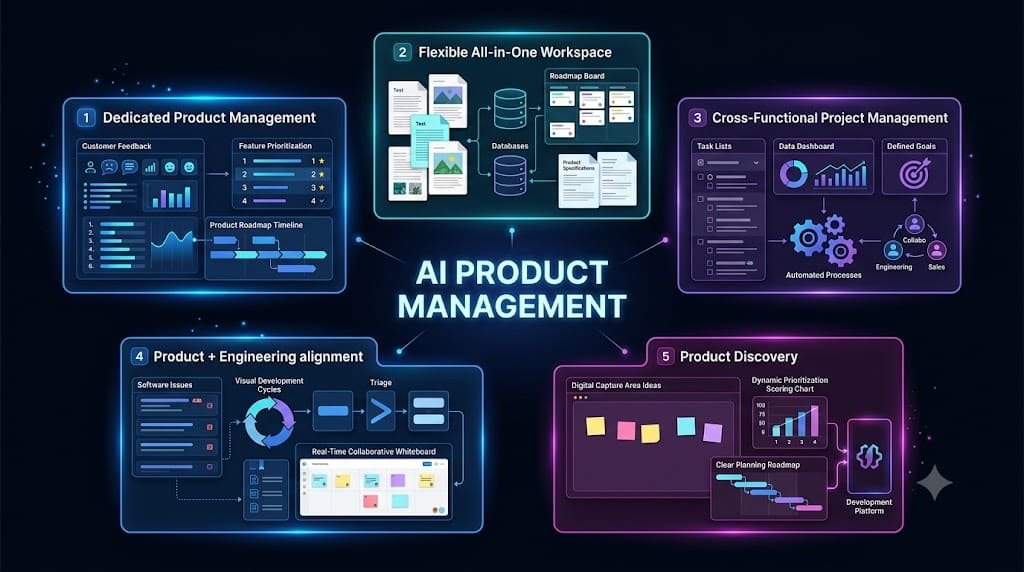
5 Best AI Tools for Product Management in India
These five were chosen to cover a genuinely useful range: a dedicated product management platform, a flexible all-in-one workspace, a broader project suite, an engineering-focused issue tracker, and an Atlassian-ecosystem discovery tool. Pricing below is in USD as published by each company; where pricing is custom, that’s noted rather than guessed at.
Productboard
What Is It?
Productboard is a dedicated AI product management platform built specifically for product teams rather than general project tracking. It centralises feedback, feature ideas, and roadmaps, and every plan now includes an AI agent called Spark.
Key Features
Unlimited roadmaps and prioritisation frameworks
A centralised customer insights repository with feedback loop closing
Timeline and column-based roadmaps with release planning
Integrations with Jira, Azure DevOps, Slack, Teams, and Figma
AI Capabilities
Spark handles workspace-aware AI chat, feedback summaries, surfaced findings, and drafting of specs and discovery documents. AI runs on monthly credits, so heavy use can hit the cap and require paid top-ups.
Pricing
Free (50 AI credits/month); Plus at $19/maker/month billed annually or $25 monthly (250 credits); Business at $59/maker/month annually, two-maker minimum (500 credits); Enterprise is custom, five-maker minimum.
Ease of Use
Moderately complex — the maker/contributor structure takes some getting used to, though the interface itself is clean.
Best For
Dedicated product teams that want one home for feedback, prioritisation, and roadmapping, and are ready to pay per maker.
Pros and Cons
+ Purpose-built for product management, not general project tracking
+ Strong feedback centralisation and genuinely useful AI for specs
+ Roadmap views that present well to leadership
– Per-maker pricing adds up for larger teams
– AI is credit-limited
– No built-in knowledge base, so a separate docs tool is still needed
Verdict
A strong pick if product management is your team’s full-time job, though it can feel like overkill and gets expensive for a very early-stage team.
Notion
What Is It?
Notion is an all-in-one workspace for notes, documents, and lightweight project tracking. It isn’t a dedicated product management tool, but many teams build roadmaps and specs inside it because of how flexible it is.
Key Features
Customizable databases that double as roadmaps or backlogs
Linked docs for PRDs and specs, with ready-made roadmap templates
Kanban and timeline views
Enough flexibility to build a basic feedback tracker from scratch
AI Capabilities
Notion AI, fully bundled into the Business plan, can summarise pages, draft documents, and answer questions across the workspace through Notion Agent. Free and only get a limited AI trial. It’s general-purpose AI layered over documents, not a product-management-specific AI, so it won’t score features or apply prioritisation frameworks on its own.
Pricing
Free plan; Plus at $10/user/month billed annually or $12 monthly; Business at $20/user/month billed annually or $24 monthly, required for full AI access; Enterprise is custom.
Ease of Use
Beginner-friendly for simple notes, though building a real roadmap system from scratch takes some setup time.
Best For
Small teams and early-stage startups that want one flexible workspace for docs, specs, and a simple roadmap without paying for a dedicated PM tool yet.
Pros and Cons
+ Extremely flexible and doubles as a documentation hub
+ Affordable at the Plus tier
+ Already widely used across Indian startups, so adoption is easy
– Not purpose-built for prioritisation or feedback scoring
– Full AI is locked behind the $20/user Business plan
– No native customer feedback portal
Verdict
A sensible starting point for small teams that want one tool doing many jobs, though it needs more manual setup than tools built specifically for product management.
ClickUp
What Is It?
ClickUp is an all-in-one project and work management platform covering tasks, docs, goals, and dashboards, with an AI layer called ClickUp Brain available as an add-on.
Key Features
Customizable task views — list, board, Gantt, and timeline
Goal tracking and dashboards for reporting
Docs for specs and PRDs, with custom fields for prioritisation scoring
Automation for repetitive workflows
AI Capabilities
ClickUp Brain isn’t bundled by default; it’s a separate add-on at around $9 per user per month, with a higher Everything AI tier around $28 per user per month for expanded credits and premium models. It summarises tasks and docs and generates subtasks, but the added AI cost is worth budgeting for upfront.
Pricing
Free plan; Unlimited at $7/user/month billed annually or $10 monthly; Business at $12/user/month billed annually or $19 monthly; Enterprise is custom. Brain AI is billed separately.
Ease of Use
Moderately complex — the huge number of views and settings is powerful but can overwhelm a team in the first few weeks.
Best For
Growing teams that want one platform for product work and general project management across departments, not just the product team.
Pros and Cons
+ Affordable entry pricing and a generous free plan
+ Extremely customizable, with strong automation options
+ Useful for cross-functional teams beyond product alone
– AI is a separate paid add-on, not included
– The volume of features can slow onboarding
– Not built specifically around customer feedback or insight
Verdict
Good value for small and growing Indian businesses that need one tool to run product work alongside other operations, provided the team invests time in initial setup.
Linear
What Is It?
Linear is a fast, keyboard-driven issue tracker built primarily for engineering teams, with product-oriented features like project tracking, cycles, and an integrated AI agent platform.
Key Features
Projects and cycles for planning sprints
A roadmap view for tracking initiatives
Triage for incoming requests
A clean interface keeping engineering and product aligned
AI Capabilities
Linear includes an AI agent platform on every plan at no extra cost, with Triage Intelligence and Linear Insights on Business. The AI leans toward development workflows — summarising issues, automating triage — rather than customer feedback analysis, so it complements product management more than it replaces a dedicated PM tool.
Pricing
Free plan (up to 250 issues, 2 teams); Basic at $10/user/month billed annually; Business at $16/user/month billed annually; Enterprise is custom. Paid plans are annual-only.
Ease of Use
Beginner-friendly for anyone used to modern software tools, though it’s built with engineers in mind first.
Best For
Startups and SaaS teams where product and engineering work extremely closely together and want one lightweight, fast tool instead of a heavier PM suite.
Pros and Cons
+ Fast, clean interface with almost no learning curve for technical teams
+ Reasonably priced, with AI included rather than sold separately
+ Strong fit for teams already writing and tracking issues
– Not designed for customer feedback collection or prioritisation frameworks
– Annual-only billing for paid plans
– Less useful for non-technical stakeholders
Verdict
An excellent choice for product teams working in lockstep with engineering, though it needs pairing with a separate feedback tool for heavy stakeholder input.
Jira Product Discovery
What Is It?
Jira Product Discovery, or JPD, is Atlassian’s dedicated tool for capturing ideas, scoring them against prioritisation criteria, and building roadmaps, designed to sit alongside Jira Software.
Key Features
Idea capture and management with custom scoring fields
Roadmap views for tracking prioritised work
Direct integration with Jira Software, Jira Service Management, and Confluence
Unlimited, free contributors on every plan
AI Capabilities
JPD’s AI features are more limited compared to Productboard or Notion, focused mainly on helping organise ideas within the Atlassian ecosystem rather than a standalone conversational AI agent. Teams wanting heavy AI-driven feedback analysis will likely find this the weakest of the five on that front.
Pricing
Free plan for up to three creators; Standard at $10 per creator per month; Premium at $25 per creator per month. Contributors, who only view or comment, don’t count toward the bill.
Ease of Use
Moderately complex for teams new to Atlassian tools, but straightforward for anyone already using Jira.
Best For
Product teams at companies already running Jira Software for development, who want prioritisation and roadmapping without a completely separate platform.
Pros and Cons
+ Free, unlimited contributors keep costs down for teams with many stakeholders
+ Tight native integration with Jira and Confluence
+ A genuinely usable free plan for a small team testing the tool
– AI capabilities lag behind more product-management-specific competitors
– Value depends heavily on already using other Atlassian products
– The three-creator free cap is limiting the moment a team grows
Verdict
A smart, cost-effective choice specifically for teams already invested in Jira, but not the strongest standalone pick for a team starting from zero.
Comparison Table
| Tool | Starting Price | Ease of Use | Brand Recognition | AI Features | Best For |
|---|---|---|---|---|---|
| Productboard | Free; $19/maker/mo | Moderate | High | Strong (Spark AI) | Dedicated product teams |
| Notion | Free; $10/user/mo | Beginner-friendly | Very high | Moderate (Business plan) | Small teams, one flexible workspace |
| ClickUp | Free; $7/user/mo | Moderate | High | Add-on ($9+/user/mo) | Cross-functional teams |
| Linear | Free; $10/user/mo | Beginner-friendly | High among startups | Included | Product + engineering teams |
| Jira Product Discovery | Free; $10/creator/mo | Moderate | Very high | Limited | Teams already using Jira |
Notion and Linear have the gentlest learning curve for a new team, while Productboard and Jira Product Discovery take longer to configure properly. On price, ClickUp’s Unlimited plan and Linear’s Basic plan sit at the lower end, though ClickUp’s AI is billed separately.
For early-stage startups with a tight budget, Notion or ClickUp’s free plans are the more practical start. For an established product team that lives on prioritisation frameworks, Productboard is built more specifically for that job, and its Spark AI currently goes further than the other four for drafting specs and analysing feedback at scale.
If a team already runs Jira Software, Jira Product Discovery is the natural next step rather than a second platform. And for a small Indian business watching every rupee, Notion’s Plus plan or ClickUp’s Unlimited plan generally offer the best balance of cost and capability while the team finds its footing.
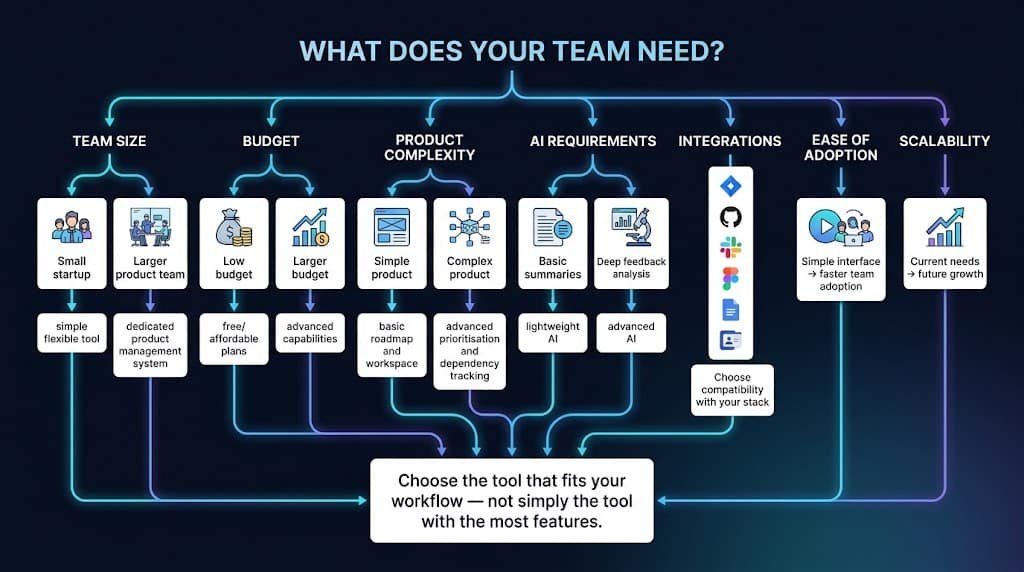
How to Choose the Right Tool
- Team size: a two-person founding team and a twenty-person product org need very different things — smaller teams do better starting simple, larger ones need dedicated prioritisation and permissions.
- Budget: look at total cost, not just the sticker price — per-seat AI add-ons and minimum-maker requirements change the real number.
- Product complexity: a simple product may need only a shared doc and a board; a complex one needs proper roadmapping and dependency tracking.
- AI requirements: decide between basic AI assistance and deeper AI that can analyse hundreds of feedback items and surface patterns.
- Integrations: check that the tool genuinely connects to what the team already uses — Slack, Jira, GitHub, Figma, Google Workspace, or the CRM.
- Ease of adoption: a powerful platform nobody opens every day isn’t actually useful.
- Scalability: consider whether the tool can grow with the business over the next two or three years.
As a starting point: a small startup just getting organised can begin with Notion or ClickUp’s free plans. An established team needing dedicated prioritisation and stronger AI should look at Productboard. Teams where product and engineering work tightly together should consider Linear. And companies already running Jira should default to Jira Product Discovery.
How to Slowly Implement It
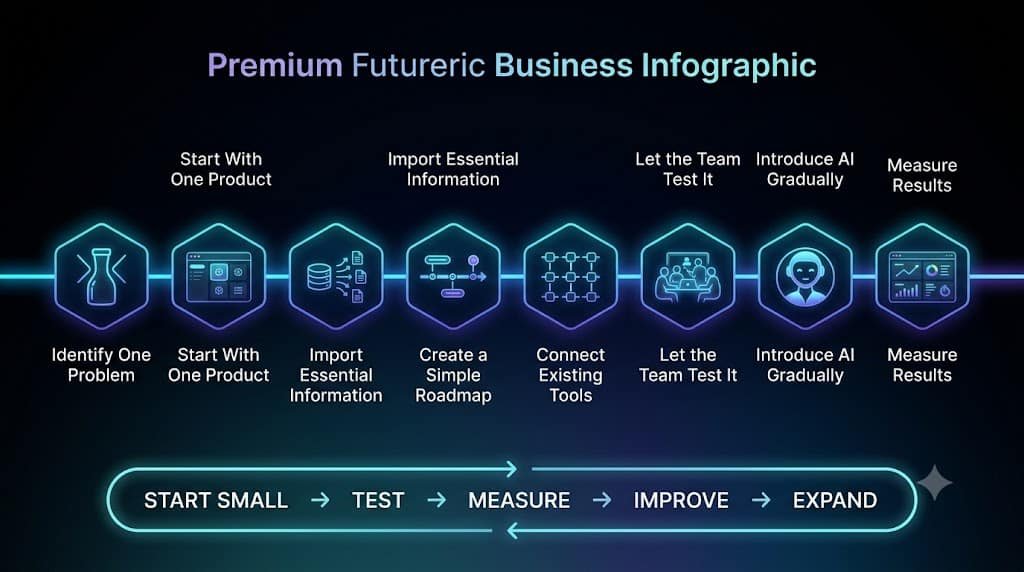
Introducing product management software doesn’t have to disrupt how the team already works. A gradual rollout tends to stick better than a sudden switch.
- Identify one problem — start with the biggest bottleneck, not everything at once.
- Start with one product — don’t migrate everything on day one.
- Import only essential information — avoid unnecessary migration of stale data.
- Create a simple roadmap — start with major priorities, not full detail.
- Connect existing tools — integrate what the team already relies on.
- Let the team test it — give people real time to get comfortable.
- Introduce AI features gradually — start with summaries and documentation before automation.
- Measure results — track time saved, fewer repetitive tasks, and better roadmap visibility.
The principle is simple: start small, test, measure, improve, then expand.
How Much Time Can These Tools Save?
There’s no universal statistic here, and any article handing you one is guessing. What’s more useful is to figure out where time can potentially be saved.
| Activity | Manual Process | With AI / Product Tool |
|---|---|---|
| Meeting notes | Manual writing | AI-assisted summary |
| Customer feedback | Manual review | AI grouping and summarisation |
| Roadmap updates | Manual updates | Centralized workflows |
| Task creation | Manual entry | AI-assisted creation |
| Documentation | Written from scratch | AI-assisted drafting |
| Reporting | Manual compilation | Automated reports and dashboards |
Actual savings depend on team size, existing workflow, the tool chosen, and how much manual work already exists. As an illustrative example only: if a product manager spends around five hours a week organising feedback, and an AI-assisted workflow cuts that roughly in half, the team could potentially reclaim two to three hours a week. That isn’t a guaranteed outcome for every team — it’s simply an example of where savings tend to show up.
FAQ
What is product management?
It’s the discipline of deciding what to build, why to build it, who it’s for, and what to prioritise next, based on customer needs and business goals.
What is the difference between product management and inventory management?
Product management decides what a business should build and improve. Inventory management tracks physical stock, warehouses, and reordering. They can overlap in physical-product businesses but are fundamentally different functions.
What are AI product management tools?
Software platforms that use AI to help teams organise ideas, analyse feedback, build roadmaps, and reduce repetitive administrative work.
Which AI tool is best for product managers?
It depends on the team. Productboard suits dedicated teams wanting deep AI and prioritisation. Notion suits small teams wanting flexibility. Linear suits teams working closely with engineering. There’s no single universal winner.
Are AI product management tools useful for startups?
Yes, particularly for organising scattered feedback and cutting administrative work, which matters even more when everyone is doing multiple jobs.
How much do product management tools cost?
Most tools in this article offer a free plan, with paid tiers generally ranging from about $7 to $75 per user per month, and custom Enterprise pricing for larger organisations.
Can AI replace product managers?
No. AI can summarise information and speed up repetitive tasks, but deciding what to build, and why, still needs a person who understands the customer and the business.
Can small businesses use AI product management software?
Yes. Notion, ClickUp, and Jira Product Discovery all offer usable free plans that work well for small teams before any paid upgrade becomes necessary.
Bottom Line
AI product management tools aren’t meant to replace product managers. They’re meant to remove the repetitive work so product managers can spend more time on the decisions that actually matter.
Across the five tools compared here, the common thread is the same: organising information, analysing feedback, creating roadmaps, prioritising work, and reducing administrative tasks. The biggest benefit isn’t replacing people — it’s giving people more time for higher-value work.
If you’re deciding where to start, keep it practical. Start with the biggest bottleneck in your process. Choose one appropriate tool from this list. Test it with one product or team. Measure the results honestly. Then expand gradually, once you can see it’s actually working.
Published by Crackk.com
Crackk.com covers artificial intelligence, AI tools, automation, technology, and practical AI applications for businesses, helping founders and professionals understand how to use emerging technology effectively in real-world work.