

How to Use ClickUp AI for Business in India
Introduction
A design agency in Bengaluru runs eight client projects at once. The tasks live in ClickUp. Conversations happen over WhatsApp and email. Meeting notes sit in a shared Google Doc that only half the team actually opens. Every Friday, a project manager spends two hours overlooking tasks, chats, and half-finished docs to write a status update nobody enjoys writing. That’s a practical example of ClickUp AI for business in India at work.
problem here isn’t the lack of tools. The information needed to answer a simple question — “where do things actually stand?” — is scattered across five places, and someone has to manually stitch it together every week. This is exactly the situation ClickUp AI for business in India is built to solve. As ClickUp already holds most of that information in one workspace, the AI layer, ClickUp Brain, helps people actually use it without reading every task by hand.
To be clear from the outset: ClickUp AI for business in India isn’t about running a company without people. It’s about using AI to understand work faster, draft the first version of things people used to write from scratch, and surface what actually needs attention. This article walks through practical ways an Indian business — a small team or a larger one — can put ClickUp AI to work, where it falls short and how to roll it out without disrupting a team that’s already busy.
What Is ClickUp AI?
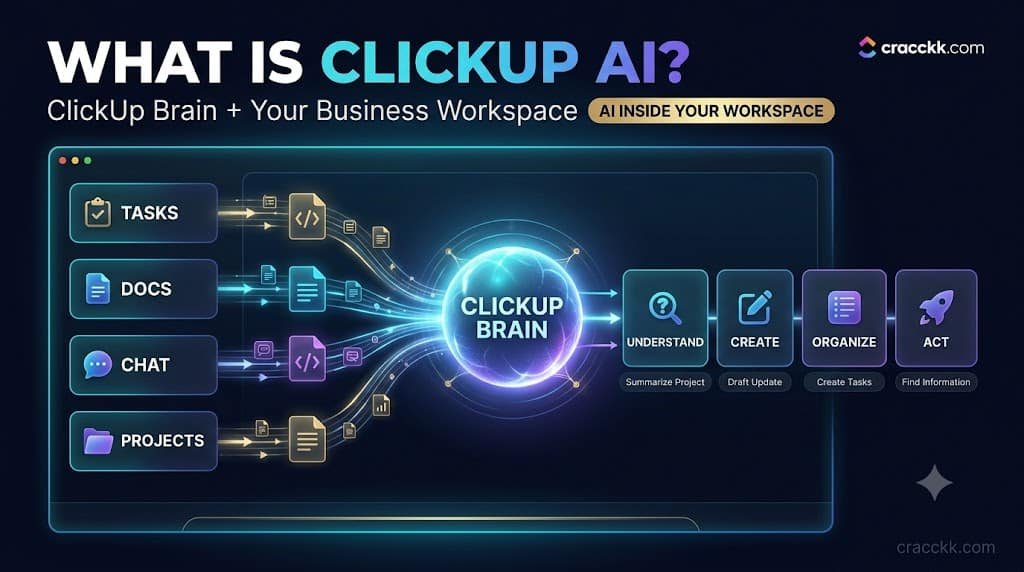
ClickUp is a work management platform — tasks, docs, chat, goals, and dashboards, all in a single workspace to replace the tools most growing businesses end up with. ClickUp Brain is the AI layer on top of that workspace, and it was rebuilt in 2026 as Brain 2, which added persistent memory and automatic routing between AI models like Claude, GPT, and Gemini depending on what a request needs. This is one of the more useful entry points into ClickUp AI for business in India.
The simplest way to think about it: ClickUp manages the work, and ClickUp Brain helps people understand, create, organise, and act on that work faster. Because Brain operates inside the workspace rather than as a separate chatbot, it can see the actual task, its comments, its subtasks, and related docs when you ask it something. This is different from the old pasting information into a general AI assistant and hoping for the best. It’s a small but real illustration of what ClickUp AI for business in India looks like day-to-day.
Brain can, depending on plan and current availability, create tasks and subtasks from a plain-language instruction, summarise a task, a project, a document, or a chat thread, draft written content like updates or briefs, and — through newer AI agents sometimes called Super Agents — carry out more autonomous, multi-step actions inside a workspace. Which tools are available depends on your ClickUp plan and AI add-on, and ClickUp’s own feature set has changed more than once in the past year, so it’s worth checking current availability before assuming a specific capability is included. For many teams, this is where ClickUp AI for business in India actually earns its place.
Why Indian Businesses Can Use ClickUp AI
This isn’t limited to any one type of company. Startups juggling limited headcount, agencies running many client accounts at once, D2C brands coordinating marketing and operations, SaaS teams tracking sprints, and consulting firms managing deliverables across clients all deal with the same underlying problem: information scattered across tasks, chats, and documents that someone has to put together manually. This is exactly the kind of task ClickUp AI for business in India is meant to speed up.
A 15-person marketing agency in Pune managing 12 retainer clients faces a genuinely different coordination problem than a two-person D2C brand shipping its first product, but both end up spending real time on the same categories of work: creating tasks, tracking deadlines, preparing updates, and organising meeting notes. That overlap is what makes ClickUp AI for business in India relevant across such different company types — it’s less about industry and more about how much repetitive coordination work a team is already doing manually.
Remote and hybrid teams get a specific benefit here too. When people aren’t in the same room, written updates and organised task information matter more, not less, and AI-assisted summarisation can reduce how much a manager needs to chase people for a status update. It’s a reasonable starting point for anyone experimenting with ClickUp AI for business in India.
How to Use ClickUp AI for Business
This is the practical core of this guide.
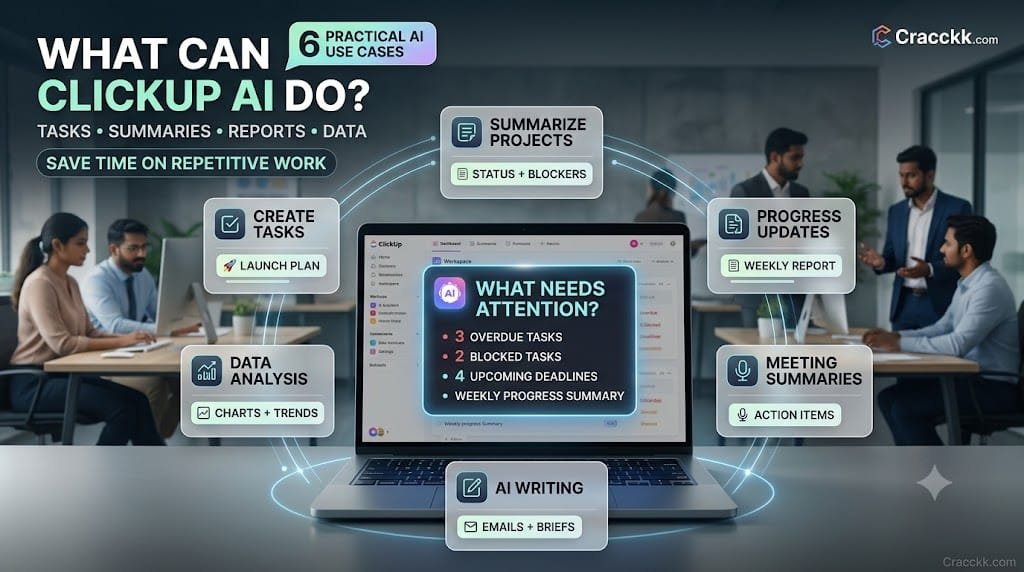
Create and Break Down Tasks
Instead of building a task list from a blank page, a manager can describe the outcome and let Brain draft the structure. Something like: “Create a product-launch plan for our new subscription service” can come back with a first pass at research, landing page work, pricing, marketing, sales preparation, launch communications, and a post-launch review — as separate tasks a manager then edits, reassigns, or deletes. This reflects how ClickUp AI for business in India tends to play out in a real workspace.
The important distinction is that this is a draft, not a finished plan. Nobody should assign these tasks to the team before checking that they reflect how this specific launch actually needs to work. AI is good at producing a reasonable starting structure quickly; it isn’t good at knowing your product’s actual constraints. That distinction matters when planning how ClickUp AI for business in India fits a team’s workflow.
Summarise Projects
Instead of opening forty tasks to understand where a project stands, a manager can ask Brain to summarise progress, flag blocked or overdue tasks, and highlight upcoming deadlines. This is one of the more immediately useful applications of ClickUp AI for business in India, because it directly replaces the kind of manual task-by-task review that eats up a Friday afternoon.
Create Progress Updates
A prompt like “summarise the last seven days of progress and highlight anything that could delay the launch” can produce a rough draft of exactly the update a manager would otherwise write from scratch. A useful output typically includes what was completed, what’s in progress, what’s blocked, and what deserves attention — which the manager then reviews and sends, rather than publishing unedited. This is a good example of what ClickUp AI for business in India can realistically deliver.
Meeting and Chat Summaries
Brain can summarise team discussions, comments, and chat threads, and — where supported — help turn action items mentioned in a conversation into actual tasks. This is useful for meetings that generate a dozen small follow-ups nobody writes down consistently. It’s worth checking current integration coverage before assuming every meeting platform your team uses connects automatically, since this has expanded over time but isn’t universal. It’s worth keeping in mind as a team scales its use of ClickUp AI for business in India.
AI Writing for Business
Brain can help draft emails, project briefs, internal announcements, marketing copy, documentation, proposals, and task descriptions. The value here is speed to a first draft, not a finished, ready-to-send document — anything customer-facing or externally visible should be reviewed by a person who knows the account and the tone the business actually wants, before it goes out. This is part of what makes ClickUp AI for business in India genuinely useful rather than just a buzzword.
Data Analysis
ClickUp’s AI features currently extend to working with business data directly — calculating totals, cleaning or transforming spreadsheet data, spotting trends, and generating charts or reports from that data. A D2C company could upload a month of sales data and ask: “Compare this month’s sales with last month and identify the five biggest changes.” As with any AI-generated calculation, the actual numbers are worth spot-checking against the source data before they inform a real decision, particularly anything involving revenue or spend. That’s the kind of time-saving ClickUp AI for business in India is actually good at.
ClickUp AI for Different Business Departments
Sales teams can use it for lead-related task management, drafting follow-up messages, summarising sales call notes, organising pipeline-related tasks, and putting together sales reports faster than compiling them by hand. This is a core, practical use of ClickUp AI for business in India, not an edge case.
Marketing teams can use it for campaign planning, first drafts of content briefs, social media planning, creating the tasks behind a campaign, and summarising how a campaign performed once it’s run. It’s the sort of everyday task where ClickUp AI for business in India adds real value.
Operations teams can use it for workflow management, task assignment, documenting processes as they’re built, daily operational updates, and pulling together operational reports without manually compiling data from several boards. This is one reason ClickUp AI for business in India has become relevant for growing Indian teams.
HR teams can use it for onboarding task lists, training plan outlines, internal documentation, and organising HR-related workflows — though hiring and firing decisions should stay firmly with people, not an AI tool summarising a candidate’s profile. That’s a practical example of ClickUp AI for business in India at work.
Customer support teams can use it to organise support-related tasks, summarise recurring customer issues, generate follow-up tasks, and route work to the right person faster. This is a direct, practical benefit of ClickUp AI for business in India.
Management gets arguably the most direct benefit: project summaries, business reports, dashboards, and a faster way to spot which work is blocked, without waiting for someone to compile that picture manually. This is one of the more useful entry points into ClickUp AI for business in India.
A Real-World ClickUp AI Business Workflow
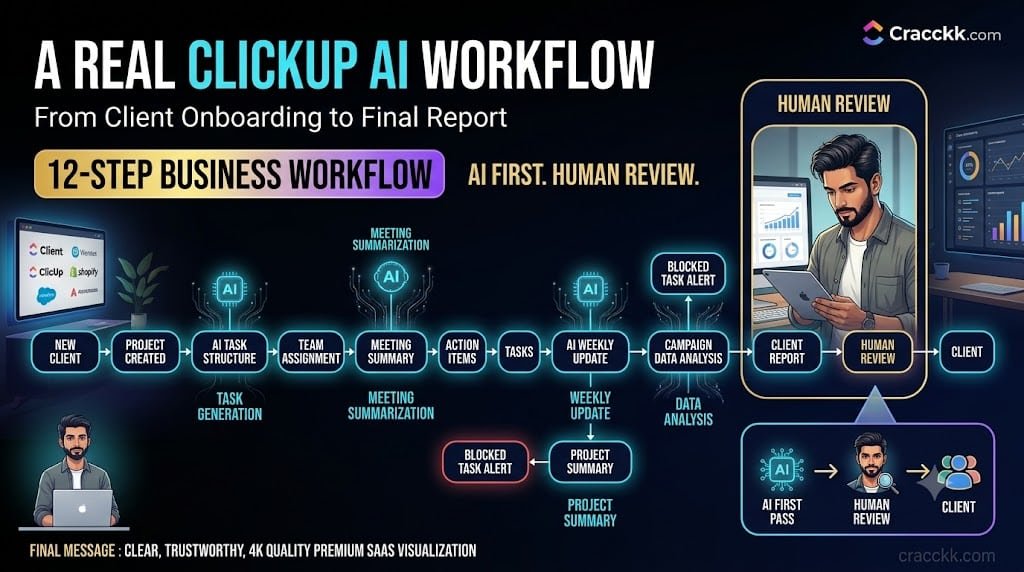
Here’s how this might look end-to-end for an Indian digital marketing agency managing 20 client accounts. That’s a realistic expectation for ClickUp AI for business in India, not an exaggerated one.
- A new client signs on, and a project is created in ClickUp. This is another concrete case of ClickUp AI for business in India in daily use.
- Brain helps generate an initial task structure based on the type of engagement.
- Team members are assigned to specific tasks.
- Weekly meeting notes are summarised automatically.
- Action items from those meetings become tasks.
- Brain drafts the client’s weekly update from the week’s task activity.
- A manager reviews project progress through an AI-generated summary.
- Blocked or overdue tasks are flagged before they become a client-facing problem.
- Campaign performance data is analysed for the client report.
- The client report is assembled from that analysis.
- A person reviews everything — the update, the report, the numbers — before anything goes out.
- The final communication is sent to the client.
Twelve steps, and a human being reviewed the two that actually reach the client. Everything upstream ran faster because the AI layer was doing the first pass, not the final one. It reflects how teams are actually using ClickUp AI for business in India right now.
ClickUp AI vs. Normal ClickUp Workflows
It helps to see the difference side by side — what changes when AI is layered onto a task that ClickUp could already handle without it. This is exactly why more Indian teams are exploring ClickUp AI for business in India.
| Sample ID | Heading 1 | Heading 2 |
|---|---|---|
| Sample #1 | Row 1, Content 1 | Row 1, Content 2 |
| Sample #2 | Row 2, Content 1 | Row 2, Content 2 |
| Sample #3 | Row 3, Content 1 | Row 3, Content 2 |
The pattern across every row is the same: AI adds interpretation, drafting, and analysis on top of the underlying workflow. It doesn’t remove the need for someone to check the result and decide what happens next. It’s a small but real illustration of what ClickUp AI for business in India looks like day-to-day.
How to Create Your First ClickUp AI Workflow
- Choose one repetitive business problem — a weekly report, a recurring meeting summary, something that actually costs time every week.
- Put the relevant work into ClickUp if it isn’t already there.
- Organise Spaces, Folders, Lists, and Tasks so the information Brain draws on is actually structured, not scattered.
- Give Brain enough context — the more organised the workspace, the better the output. That’s a small but telling sign of what ClickUp AI for business in India can do.
- Write a clear instruction, not a vague one.
- Review the AI output before treating it as final.
- Turn useful results into a repeatable task or workflow, so the next week doesn’t start from scratch. It fits the broader pattern of how ClickUp AI for business in India gets adopted.
- Measure whether the process actually improved — faster, more accurate, less manual work — rather than assuming it did. This is one more example worth noting when weighing ClickUp AI for business in India.
Skipping the organising step is the most common reason this doesn’t work well. AI layered on top of a messy, disorganised workspace produces messy, unreliable output — it can’t summarise information that isn’t actually captured anywhere. For many teams, this is where ClickUp AI for business in India actually earns its place.
How to Write Better Prompts for ClickUp AI
A vague prompt gets a vague answer. “Summarise this” produces something generic. A better version specifies what’s being summarised, what to look for, and what format matters: “Summarise the current project, list completed tasks, identify blocked tasks, and highlight deadlines that could affect the launch.” This is exactly the kind of task ClickUp AI for business in India is meant to speed up.
The same principle holds across departments. For marketing: “Draft three social captions for this product launch, in a confident but not salesy tone, under 200 characters each.” For sales: “Summarise this week’s sales calls and flag any deal that’s gone quiet for more than five days.” For operations: “List every overdue task in this Space, grouped by assignee.” For reporting: “Turn this month’s task activity into a client-ready update, organised by what’s done, in progress, and blocked.” It’s a reasonable starting point for anyone experimenting with ClickUp AI for business in India.
Good prompts for ClickUp AI for business in India tend to specify the same things regardless of department: what context to use, the actual goal, the desired format, the relevant time period, and any constraints that matter. The more specific the instruction, the less editing the output needs afterwards.
How to Slowly Implement ClickUp AI
Rolling out every AI feature at once tends to overwhelm a team and produce inconsistent results. A staged approach works better: That’s a fair, grounded way to think about ClickUp AI for business in India.
Stage 1: Start with writing and summarisation — the lowest-risk, most immediately useful applications. That’s the practical value of ClickUp AI for business in India in a single sentence.
Stage 2: Move to task creation and project organisation once the team is comfortable with the basics. It’s a clear, everyday example of ClickUp AI for business in India in practice.
Stage 3: Add reporting and data analysis, where the stakes of a wrong output are higher and review matters more. This is a good illustration of ClickUp AI for business in India applied to a real task.
Stage 4: Use AI to support recurring workflows that already run every week or month. That’s the kind of outcome teams associate with ClickUp AI for business in India done well.
Stage 5: Experiment with more autonomous AI agents where they genuinely fit a repetitive, well-defined process. That’s the kind of shift ClickUp AI for business in India makes possible.
Stage 6: Connect broader business information where it’s useful and where data-sharing is actually permitted. It’s worth noting as part of a broader ClickUp AI for business in India rollout.
Testing each stage before expanding matters more than moving fast. A team that tries to implement ClickUp AI for business in India all at once, across every department, usually ends up with a handful of half-adopted features rather than one workflow that’s genuinely reliable.
How Much Time Can ClickUp AI Save?
There’s no honest universal number here — it depends on team size, number of active projects, how much of the work is genuinely repetitive, meeting frequency, reporting workload, and how well-organised the workspace already is. This reflects how ClickUp AI for business in India tends to play out in a real workspace.
Here’s an illustrative example, not a promised outcome: if a manager spends 30 minutes preparing a project update and does this ten times a month, that’s 300 minutes, or 5 hours a month, on that one recurring task. If AI-assisted drafting cuts the manual preparation time significantly, some portion of those 5 hours could potentially be recovered — but the real number depends entirely on the specific team, the quality of the workspace setup, and how much editing the AI draft actually needs. That distinction matters when planning how ClickUp AI for business in India fits a team’s workflow.
Who Should and Shouldn’t Use ClickUp AI
A good fit: growing teams, project-heavy businesses, agencies managing multiple clients, startups scaling past a founder’s ability to track everything personally, remote teams that rely on written updates, businesses generating a lot of documentation, and any team already using ClickUp that wants more out of the workspace it’s already in. That’s the kind of time-saving ClickUp AI for business in India is actually good at.
Possibly unnecessary: very small teams with genuinely simple workflows that don’t need this level of structure, businesses that only need a basic task list, teams unwilling to actually organise their information (since AI can’t fix that), and companies that need specialised software ClickUp isn’t built to replace, like dedicated accounting or inventory systems. This is a core, practical use of ClickUp AI for business in India, not an edge case.
Frequently Asked Questions
What is ClickUp AI?
It’s ClickUp Brain, the AI layer built into the ClickUp workspace that can summarise information, draft content, create tasks, and analyse data using the context already present in your tasks, docs, and chats. It’s the sort of everyday task where ClickUp AI for business in India adds real value.
What is ClickUp Brain?
Brain is the name for ClickUp’s native AI system. It was rebuilt in 2026 as Brain 2, adding persistent memory and automatic routing across multiple AI models depending on the request. This is one reason ClickUp AI for business in India has become relevant for growing Indian teams.
How can Indian businesses use ClickUp AI?
Mostly for the repetitive coordination work every growing business deals with: summarising project status, drafting updates and communications, creating first-pass task structures, and analysing business data — all inside a workspace many Indian startups, agencies, and D2C brands already use. That’s a practical example of ClickUp AI for business in India at work.
Is ClickUp AI useful for small businesses?
Yes, particularly once a small team has enough projects or clients that manually tracking everything starts eating real time. A very small team with one or two simple projects may not need it yet. This is one of the more useful entry points into ClickUp AI for business in India.
Can ClickUp AI create tasks?
Yes — Brain can turn a plain-language instruction into a draft task structure with subtasks, which a person then reviews and adjusts before assigning it to the team. That’s a realistic expectation for ClickUp AI for business in India, not an exaggerated one.
Can ClickUp AI analyse business data?
Yes, within the currently documented limits — it can calculate totals, clean spreadsheet data, identify trends, and generate charts or reports from uploaded data, though the specific capabilities depend on your plan. It’s a small but real illustration of what ClickUp AI for business in India looks like day to day.
Can ClickUp AI summarise projects?
Yes. This is one of its most immediately useful features: pulling together status, blockers, and deadlines from across a project without a manager reading every task individually. It reflects how teams are actually using ClickUp AI for business in India right now.
Can ClickUp AI replace project managers?
No. It removes a meaningful amount of manual reading, writing, and compiling, but judgment about priorities, client relationships, and what a project actually needs still requires a person. For many teams, this is where ClickUp AI for business in India actually earns its place.
How much does ClickUp AI cost?
Core ClickUp plans start free and run roughly $7–12/user/month for paid tiers; AI is a separate add-on, reported at roughly $7–9/user/month for the standard tier and significantly more for the broader “Everything AI” tier. Confirm current figures on ClickUp’s pricing page, since this changes. This is exactly the kind of task ClickUp AI for business in India is meant to speed up.
Is ClickUp AI free?
Not fully — AI capabilities are gated behind a separate paid add-on on top of a ClickUp plan, though the specifics of what’s included at each level have shifted over time. This is exactly why more Indian teams are exploring ClickUp AI for business in India.
Is ClickUp AI safe for business data?
ClickUp states that Brain does not use customer data to train its underlying models, and enterprise plans include additional data-residency and security controls, but any business handling sensitive data should review ClickUp’s current privacy and security documentation directly rather than assuming. It’s a reasonable starting point for anyone experimenting with ClickUp AI for business in India.
Can ClickUp AI automate workflows?
To a meaningful degree — through AI agents that can act on tasks or chat activity — though the level of autonomy and which triggers are supported depends on your plan and current feature availability. This reflects how ClickUp AI for business in India tends to play out in a real workspace.
The Bottom Line
ClickUp AI for business in India works best when it’s layered onto a workspace that’s already reasonably organised — it doesn’t fix scattered, messy information, it interprets and acts on whatever’s actually there. Used that way, it can meaningfully reduce repetitive work: drafting task structures, summarising project status, preparing reports, analysing data, and organising team communication faster than doing it all by hand.
What it doesn’t do is take over strategy, judgment, client relationships, approvals, or the decisions that actually carry consequences for the business. The teams that get the most out of ClickUp AI for business in India treat it as a way to get to a better-informed decision faster, not as a replacement for the person who has to make that decision.
If you’re starting from nothing, don’t try to turn on every AI feature in one week. Pick one recurring problem, organise the workspace around it, test whether AI genuinely helps, and expand from there once it’s proven itself. That distinction matters when planning how ClickUp AI for business in India fits a team’s workflow.
Published by Crackk.com
Crackk.com covers artificial intelligence, AI tools, automation, technology, and practical AI applications for businesses, helping founders and professionals understand how to use emerging technology effectively in real-world work.